Para quem teve a oportunidade de aprender a tocar algum instrumento musical, já se deparou com o termo: tocar uma música “cover”. Esse é o processo onde você interpreta uma música que já existe, no intuito de se divertir, e principalmente: aprender. Aqui na TI, especificamente na área de banco de dados, não seria diferente. Leio com frequência ótimos artigos técnicos, e para perpetuar o conhecimento que estou tendo contato, nada melhor do que um “cover” do artigo, ou seja, tentar colocá-lo em prática, já que a experiência é tudo nessa vida.
Desse modo, pegando um artigo do Tim Hall (o link está AQUI), decidi ter a experiência de criar banco Oracle 18C via linha de comando.
Criando os diretórios que abrigarão os dados, archives e FRA do Oracle:
[oracle@oel8 admin]$ mkdir -p /oracle/dados
[oracle@oel8 admin]$ mkdir -p /oracle/fra
[oracle@oel8 admin]$ mkdir -p /oracle/archives
Permissões:
[oracle@oel8 admin]$ chown -R oracle:oinstall /oracle/dados/ /oracle/fra/ /oracle/archives/
[oracle@oel8 admin]$ chmod 775 /oracle/dados/ /oracle/fra/ /oracle/archives/
Parâmetros usados:
dbca -silent -createDatabase                \
    -responseFile NO_VALUE                  \
    -gdbName RMANDB                         \
    -templateName General_Purpose.dbc       \
    -sid ${ORACLE_SID}                      \
    -createAsContainerDatabase false        \
    -sysPassword Oracle123                  \
    -systemPassword Oracle123               \
    -emConfiguration NONE                   \
    -dvConfiguration false                  \
    -olsConfiguration false                 \
    -datafileDestination /oracle/dados      \
    -redoLogFileSize 50                     \
    -recoveryAreaDestination /oracle/fra    \
    -recoveryAreaSize 500                   \
    -storageType FS                         \
    -runCVUChecks false                     \
    -enableArchive true                     \
    -archiveLogMode AUTO                    \
    -archiveLogDest /oracle/archives        \
    -automaticMemoryManagement false        \
    -createListener LISTENER                \
    -useOMF true                            \
    -databaseConfigType SINGLE              \
    -characterSet AL32UTF8                  \
    -sampleSchema false                     \
    -totalMemory 2048                       \
    -databaseType MULTIPURPOSE
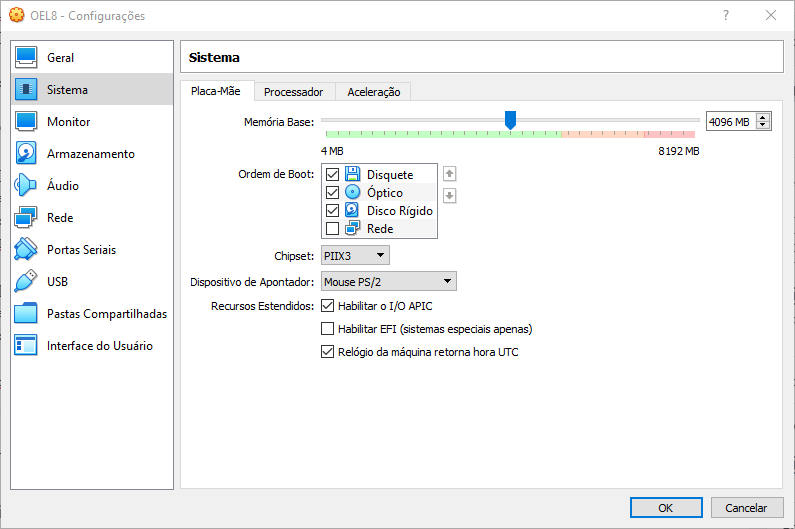
Devido ao pouco espaço de memória na máquina, o Oracle reporta um erro por conta disso (além do warning sobre o espaço mínimo de FRA):
[oracle@oel8 admin]$ dbca -silent -createDatabase                \
>     -responseFile NO_VALUE                  \
>     -gdbName RMANDB                         \
>     -templateName General_Purpose.dbc       \
>     -sid ${ORACLE_SID}                      \
>     -createAsContainerDatabase false        \
>     -sysPassword Oracle123                  \
>     -systemPassword Oracle123               \
>     -emConfiguration NONE                   \
>     -dvConfiguration false                  \
>     -olsConfiguration false                 \
>     -datafileDestination /oracle/dados      \
>     -redoLogFileSize 50                     \
>     -recoveryAreaDestination /oracle/fra    \
>     -recoveryAreaSize 500                   \
>     -storageType FS                         \
>     -runCVUChecks false                     \
>     -enableArchive true                     \
>     -archiveLogMode AUTO                    \
>     -archiveLogDest /oracle/archives        \
>     -automaticMemoryManagement false        \
>     -createListener LISTENER                \
>     -useOMF true                            \
>     -databaseConfigType SINGLE              \
>     -characterSet AL32UTF8                  \
>     -sampleSchema false                     \
>     -totalMemory 2048                       \
>     -databaseType MULTIPURPOSE
[WARNING] [DBT-06801] Specified Fast Recovery Area size (500 MB) is less than the recommended value.
   CAUSE: Fast Recovery Area size should at least be three times the database size (692 MB).
   ACTION: Specify Fast Recovery Area Size to be at least three times the database size.
[WARNING] [DBT-11209] Current available memory is less than the required available memory (2,048MB) for creating the database.
   CAUSE: Following nodes do not have required available memory :
 Node:oel8              Available memory:1.8942GB (1986164.0KB)

[FATAL] [DBT-11214] Automatic Memory Management is not a feasible option on the system.
   CAUSE: There is not enough free space on volume /dev/shm to allocate 2,048MB.
[oracle@oel8 admin]$
Aumentando a memória da máquina virtual:
Depois alterado comando para:
dbca -silent -createDatabase                \
    -responseFile NO_VALUE                  \
    -gdbName RMANDB                         \
    -templateName General_Purpose.dbc       \
    -sid ${ORACLE_SID}                      \
    -createAsContainerDatabase false        \
    -sysPassword Oracle123                  \
    -systemPassword Oracle123               \
    -emConfiguration NONE                   \
    -dvConfiguration false                  \
    -olsConfiguration false                 \
    -datafileDestination /oracle/dados      \
    -redoLogFileSize 50                     \
    -recoveryAreaDestination /oracle/fra    \
    -recoveryAreaSize 700                   \
    -storageType FS                         \
    -runCVUChecks false                     \
    -enableArchive true                     \
    -archiveLogMode AUTO                    \
    -archiveLogDest /oracle/archives        \
    -automaticMemoryManagement false        \
    -createListener LISTENER                \
    -useOMF true                            \
    -databaseConfigType SINGLE              \
    -characterSet AL32UTF8                  \
    -sampleSchema false                     \
    -totalMemory 2048                       \
    -databaseType MULTIPURPOSE
Banco criado com sucesso:
[oracle@oel8 ~]$ dbca -silent -createDatabase                \
>     -responseFile NO_VALUE                  \
>     -gdbName RMANDB                         \
>     -templateName General_Purpose.dbc       \
>     -sid ${ORACLE_SID}                      \
>     -createAsContainerDatabase false        \
>     -sysPassword Oracle123                  \
>     -systemPassword Oracle123               \
>     -emConfiguration NONE                   \
>     -dvConfiguration false                  \
>     -olsConfiguration false                 \
>     -datafileDestination /oracle/dados      \
>     -redoLogFileSize 50                     \
>     -recoveryAreaDestination /oracle/fra    \
>     -recoveryAreaSize 700                   \
>     -storageType FS                         \
>     -runCVUChecks false                     \
>     -enableArchive true                     \
>     -archiveLogMode AUTO                    \
>     -archiveLogDest /oracle/archives        \
>     -automaticMemoryManagement false        \
>     -createListener LISTENER                \
>     -useOMF true                            \
>     -databaseConfigType SINGLE              \
>     -characterSet AL32UTF8                  \
>     -sampleSchema false                     \
>     -totalMemory 2048                       \
>     -databaseType MULTIPURPOSE
[WARNING] [DBT-06801] Specified Fast Recovery Area size (700 MB) is less than the recommended value.
   CAUSE: Fast Recovery Area size should at least be three times the database size (692 MB).
   ACTION: Specify Fast Recovery Area Size to be at least three times the database size.
[WARNING] [DBT-06801] Specified Fast Recovery Area size (700 MB) is less than the recommended value.
   CAUSE: Fast Recovery Area size should at least be three times the database size (2,252 MB).
   ACTION: Specify Fast Recovery Area Size to be at least three times the database size.
Prepare for db operation
10% complete
Copying database files
40% complete
Creating and starting Oracle instance
42% complete
46% complete
50% complete
54% complete
60% complete
Completing Database Creation
66% complete
69% complete
70% complete
Executing Post Configuration Actions
100% complete
Database creation complete. For details check the logfiles at:
 /oracle/18.0.0/base/cfgtoollogs/dbca/RMANDB.
Database Information:
Global Database Name:RMANDB
System Identifier(SID):RMANDB
Look at the log file "/oracle/18.0.0/base/cfgtoollogs/dbca/RMANDB/RMANDB.log" for further details.
[oracle@oel8 ~]$
Consultando banco:
[oracle@oel8 ~]$ sqlplus / as sysdba

SQL*Plus: Release 18.0.0.0.0 - Production on Sun Apr 5 21:59:01 2020
Version 18.3.0.0.0

Copyright (c) 1982, 2018, Oracle.  All rights reserved.


Connected to:
Oracle Database 18c Enterprise Edition Release 18.0.0.0.0 - Production
Version 18.3.0.0.0

SQL> select instance_name,status from gv$instance;

INSTANCE_NAME    STATUS
---------------- ------------
RMANDB           OPEN

SQL> select banner from v$version;

BANNER
--------------------------------------------------------------------------------
Oracle Database 18c Enterprise Edition Release 18.0.0.0.0 - Production

SQL>
Consultando oratab:
[oracle@oel8 ~]$ cat /etc/oratab
#


# This file is used by ORACLE utilities.  It is created by root.sh
# and updated by either Database Configuration Assistant while creating
# a database or ASM Configuration Assistant while creating ASM instance.

# A colon, ':', is used as the field terminator.  A new line terminates
# the entry.  Lines beginning with a pound sign, '#', are comments.
#
# Entries are of the form:
#   $ORACLE_SID:$ORACLE_HOME:<N|Y>:
#
# The first and second fields are the system identifier and home
# directory of the database respectively.  The third field indicates
# to the dbstart utility that the database should , "Y", or should not,
# "N", be brought up at system boot time.
#
# Multiple entries with the same $ORACLE_SID are not allowed.
#
#
RMANDB:/oracle/18.0.0/product:N
[oracle@oel8 ~]$
Editando o mesmo para que possa ser reinicializado quando a máquina virtual subir:
[oracle@oel8 ~]$ vi /etc/oratab
Conteúdo:
#


# This file is used by ORACLE utilities.  It is created by root.sh
# and updated by either Database Configuration Assistant while creating
# a database or ASM Configuration Assistant while creating ASM instance.

# A colon, ':', is used as the field terminator.  A new line terminates
# the entry.  Lines beginning with a pound sign, '#', are comments.
#
# Entries are of the form:
#   $ORACLE_SID:$ORACLE_HOME:<N|Y>:
#
# The first and second fields are the system identifier and home
# directory of the database respectively.  The third field indicates
# to the dbstart utility that the database should , "Y", or should not,
# "N", be brought up at system boot time.
#
# Multiple entries with the same $ORACLE_SID are not allowed.
#
#
RMANDB:/oracle/18.0.0/product:Y
Além do artigo do Tim que usei como base, li com cuidado todos os parâmetros da documentação Oracle, para entender todos os valores possíveis e suas definições. A tabela você encontra neste LINK.